
Establishing a System for Analytics
Establishing a System for Analytics
Developing a shared component library for SAP's analytics products, creating a single source of truth to reduce redundant work, accelerate development, and drive greater consistency across teams.
Developing a shared component library for SAP's analytics products, creating a single source of truth to reduce redundant work, accelerate development, and drive greater consistency across teams.
COMPANY
COMPANY
SAP
SAP
ROLE
ROLE
UX UI Designer
UX UI Designer
TIMELINE
TIMELINE
4 Months
4 Months
TOOLS
TOOLS
Figma
Figma
01 - ABOUT SAP
01 - ABOUT SAP
Enterprise at Scale
Enterprise at Scale
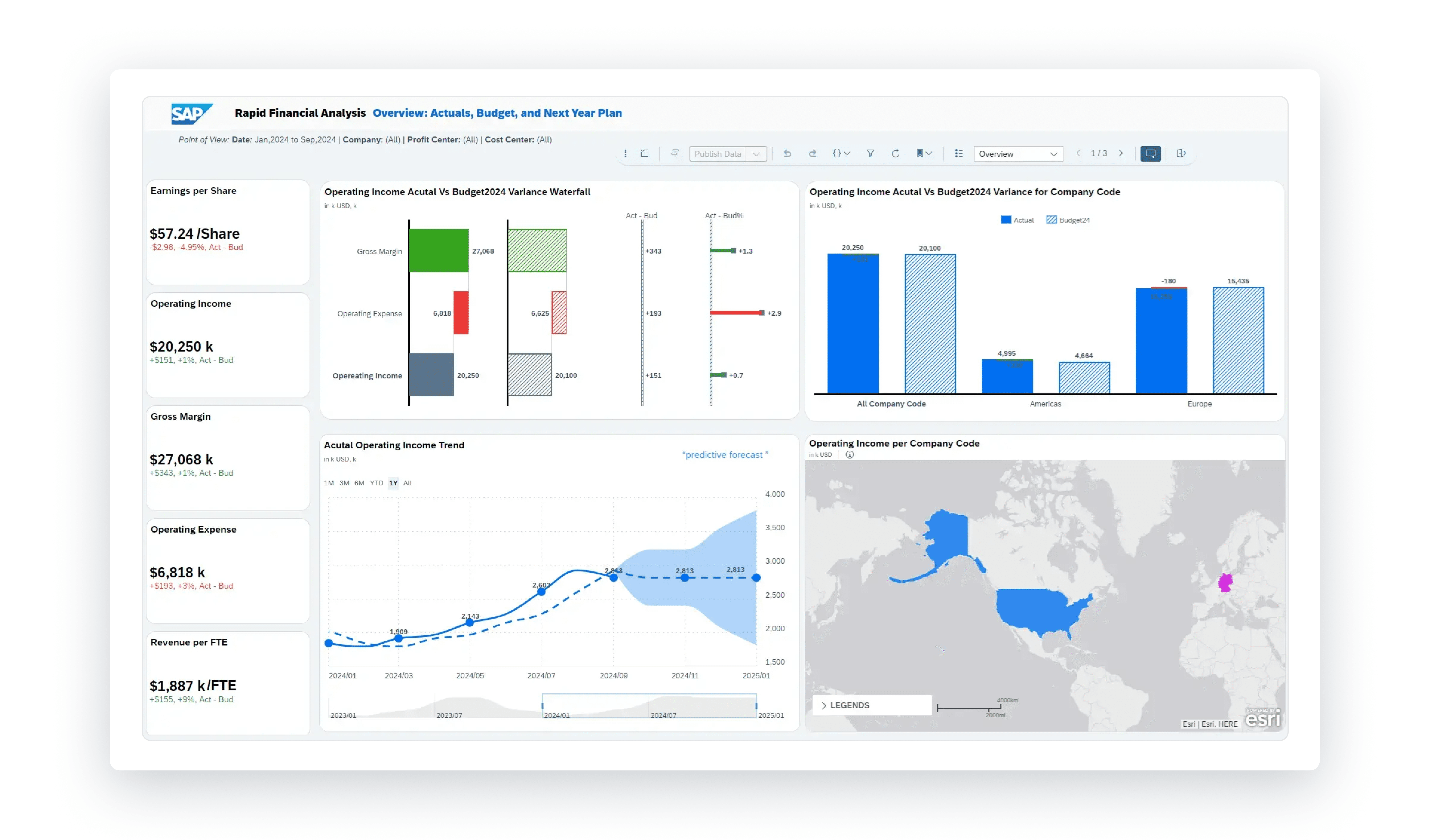
SAP is one of the world's leading enterprise software companies, helping businesses of all sizes manage operations, finances, supply chains, and data. One key aspect of this is their analytics suite, which is a series of products designed to help businesses get the most value out of their data.
MY ROLE
I spent 8 months as a UX Design Intern on the Data and Analytics (DNA) Design team, which supports the user experience across SAP's analytics suite.
02 - THE PROBLEM
02 - THE PROBLEM
A System For Analytics
A System For Analytics
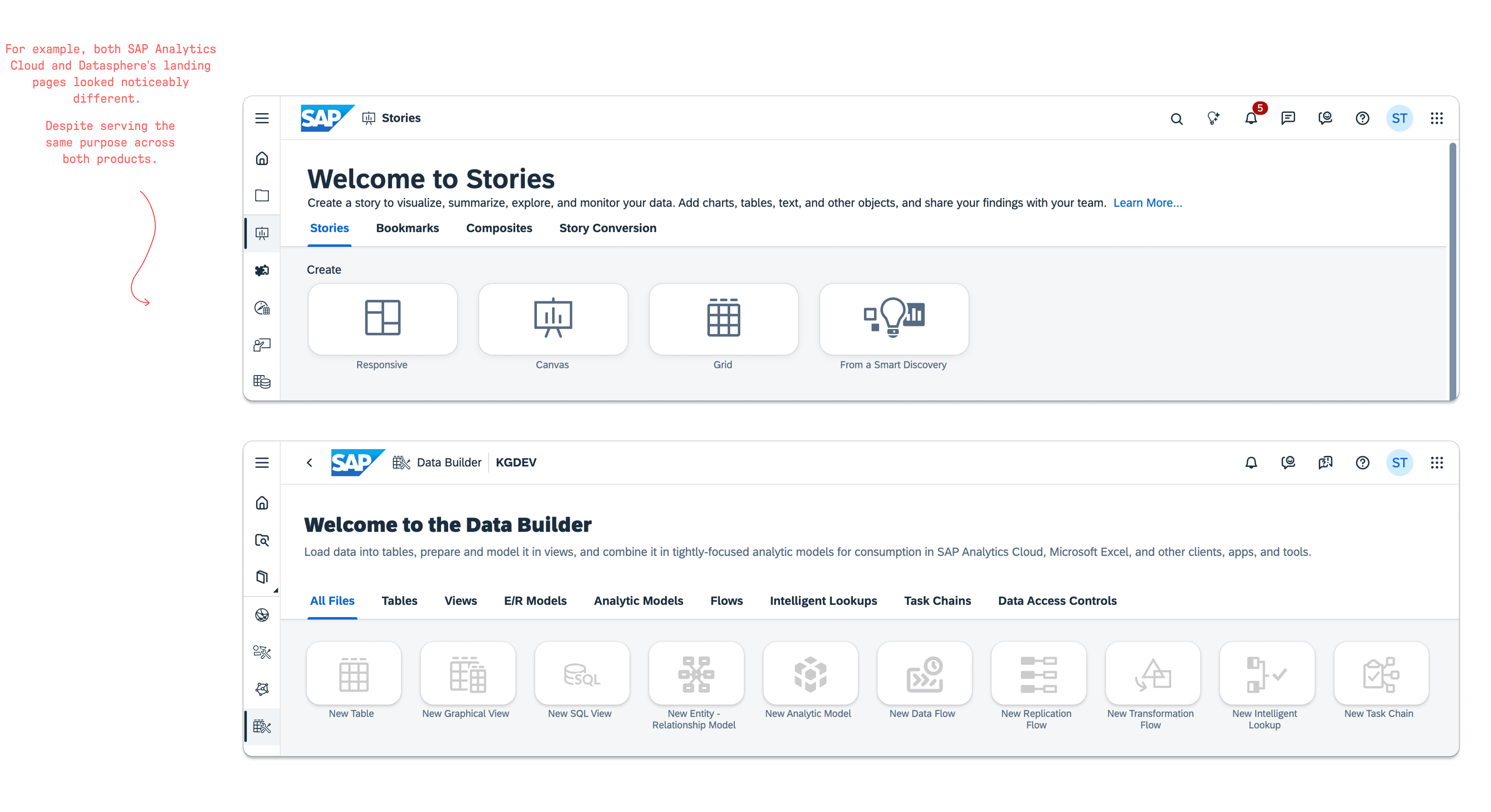
While SAP already had a working design system for the majority of their products, their analytics products often dealt with more complex and specific requirements that fell outside what the standard system could support. This meant that designers often had to build custom solutions without a shared process or foundation to align to.
While SAP already had a working design system for the majority of their products, their analytics products often dealt with more complex and specific requirements that fell outside what the standard system could support. This meant that designers often had to build custom solutions without a shared process or foundation to align to.
As a result, across SAP's analytics products, the same problems were being solved by different teams, leading to duplicate work and inconsistent outputs. Additionally, designers had to detach components in Figma in order to make these custom solutions, making it increasingly difficult to maintain quality and consistency across the suite.
As a result, across SAP's analytics products, the same problems were being solved by different teams, leading to duplicate work and inconsistent outputs. Additionally, designers had to detach components in Figma in order to make these custom solutions, making it increasingly difficult to maintain quality and consistency across the suite.
MISSION STATEMENT
MISSION STATEMENT
This created the need for the DNA Web UI Kit, a design system built specifically for SAP's analytics products as a single source of truth, reducing duplicate work and ensuring consistency across the suite.
This created the need for the DNA Web UI Kit, a design system built specifically for SAP's analytics products as a single source of truth, reducing duplicate work and ensuring consistency across the suite.
03 - MY ROLE
Where I Came In
The DNA Web UI Kit was still in its early stages when I came on board. Part of my role focused on helping move the system closer to completion by adding new components and patterns to the kit, as well as creating usage guidelines and visual specifications that designers and developers could reference in order to use them correctly.
Beyond the component work, I also helped plan and execute the release strategy for the kit. This meant thinking beyond just building the system and considering how to ensure designers across the analytics suite would actually know it existed, understand how to use it, and feel supported in adopting it from day one.
04 - CONTRIBUTIONS
04 - CONTRIBUTIONS
The Component Work
The Component Work
When building out the kit it was incredibly important that each component added accounted for the specific use cases of each product. Anything that fell short risked forcing designers to detach in order to use them, and would undermine the consistency the kit was attempting to establish. The creation tile was one example of this, and getting it right was rarely straightforward.
When building out the kit it was incredibly important that each component added accounted for the specific use cases of each product. Anything that fell short risked forcing designers to detach in order to use them, and would undermine the consistency the kit was attempting to establish. The creation tile was one example of this, and getting it right was rarely straightforward.
05 - CREATION TILE
05 - CREATION TILE
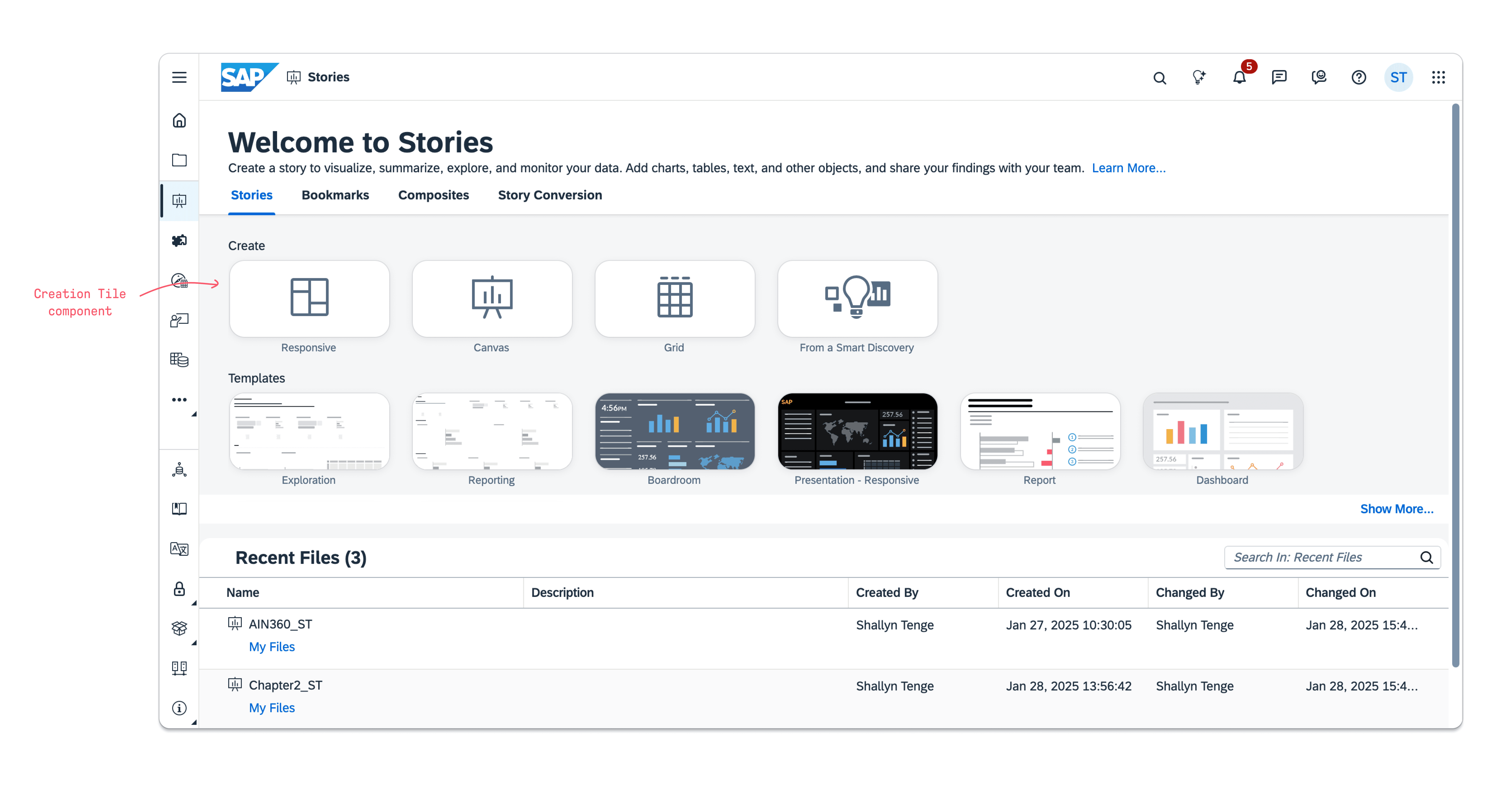
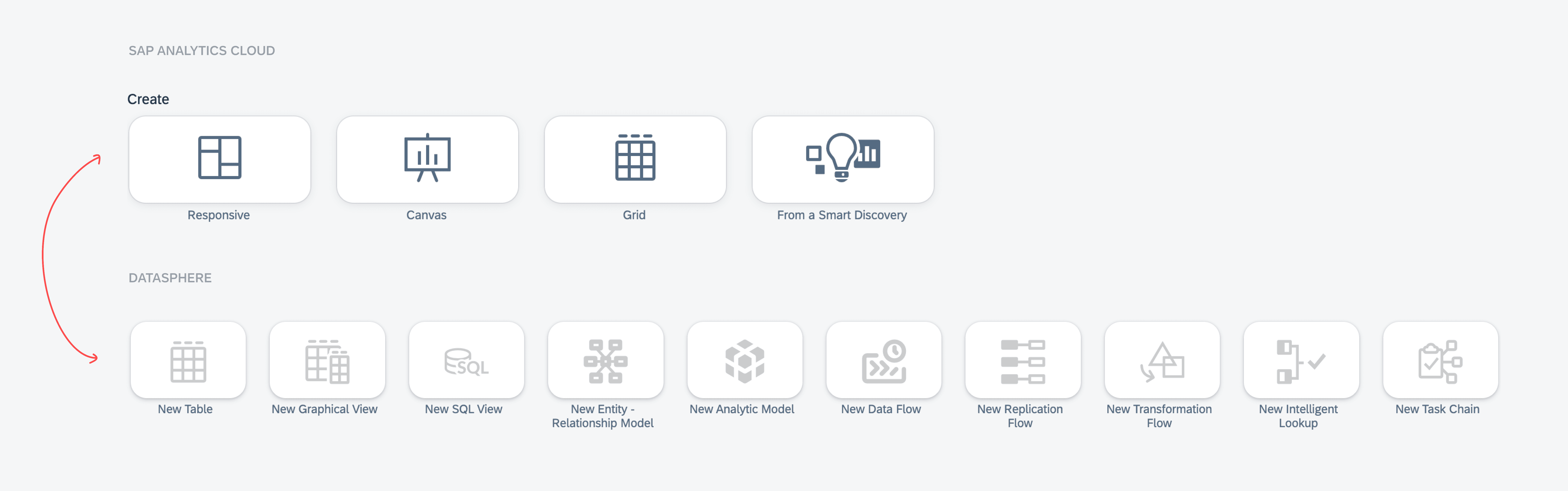
The creation tile is the starting point for creating new object across SAP's analytics products. It sits prominently on the application landing pages of SAP Analytics Cloud, Datasphere, and Business Data Cloud, making it one of the first things a user interacts with and one of the most visible components across the entire analytics suite.
The creation tile is the starting point for creating new object across SAP's analytics products. It sits prominently on the application landing pages of SAP Analytics Cloud, Datasphere, and Business Data Cloud, making it one of the first things a user interacts with and one of the most visible components across the entire analytics suite.
Despite it's visibility, the component had significant problems. The designs were different on SAP Analytics Cloud and Datasphere, and customers had raised concerns about the screen real estate it consumed, cutting into space for the file table below. There were also broader questions about it's value for more experienced users, who would not need the same level of visual guidance.
BEFORE
BEFORE
Stakeholder Alignment
Stakeholder Alignment
Coming to a solution was not straightforward. With each product having its own team and stakeholders, any change needed to work for everyone before design could begin. I developed a change proposal and worked through each team's requirements individually, but not all teams agreed. DSP wanted to remove the tiles entirely while SAC wanted to keep them. The final solution was to reduce their size, preserving their value for newer users without sacrificing the space experienced users needed.
Coming to a solution was not straightforward. With each product having its own team and stakeholders, any change needed to work for everyone before design could begin. I developed a change proposal and worked through each team's requirements individually, but not all teams agreed. DSP wanted to remove the tiles entirely while SAC wanted to keep them. The final solution was to reduce their size, preserving their value for newer users without sacrificing the space experienced users needed.
AFTER
AFTER
Creating The Solution
Creating The Solution
Once alignment was reached, I built the component in Figma, starting with a base tile before building out parent components for each product area, making it easy to switch between for use across both products. I then defined usage guidelines and documentation for designers, alongside the visual specifications developers needed for implementation. The result was a single unified component serving as the shared standard across both products, ensuring future updates would only need to be made once.
06 - SHELL BAR
06 - SHELL BAR
Ensuring each use case was covered was only half the challenge. Adding a component to a design system and adding a component that designers will actually use are two different things.
A component that is confusing to use or requires workarounds will get detached. Once detached, it no longer receives updates from the system, and the designer is back to maintaining their own version independently. While I worked on several components during my time at SAP, the Shell Bar stood out as one that made it clear why getting the build right mattered.
Ensuring each use case was covered was only half the challenge. Adding a component to a design system and adding a component that designers will actually use are two different things.
A component that is confusing to use or requires workarounds will get detached. Once detached, it no longer receives updates from the system, and the designer is back to maintaining their own version independently. While I worked on several components during my time at SAP, the Shell Bar stood out as one that made it clear why getting the build right mattered.
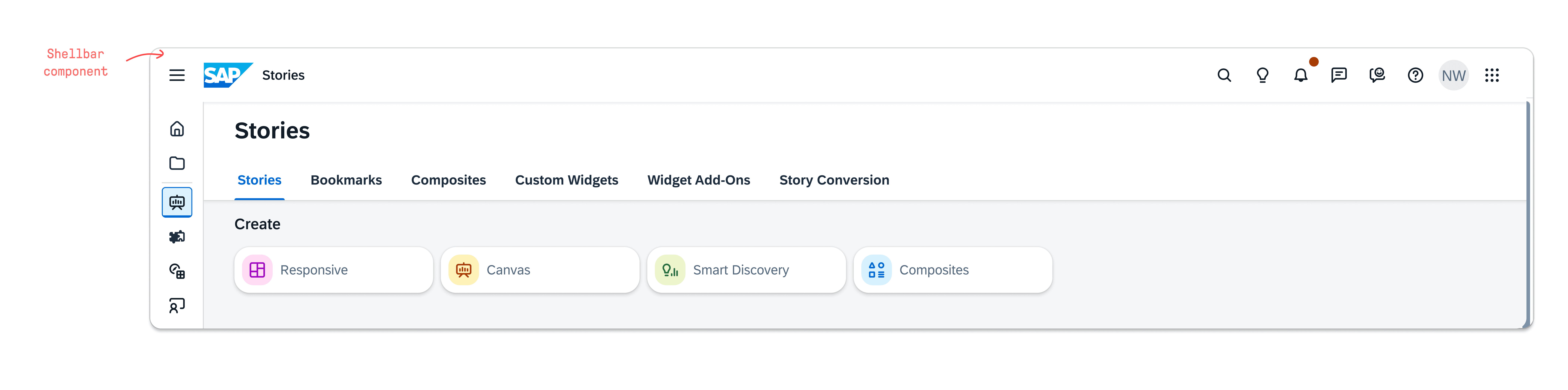
The shell bar is the main navigation component that runs across the top of all of SAP's products. While the analytics suite also required a shell bar, it had additional needs such as breadcrumb navigation and application support that the standard version didn't support, so a custom analytics version was built and added to the kit.
The shell bar is the main navigation component that runs across the top of all of SAP's products. While the analytics suite also required a shell bar, it had additional needs such as breadcrumb navigation and application support that the standard version didn't support, so a custom analytics version was built and added to the kit.
While this new version had all the necessary features, several designers raised concerns about how difficult it was to use as the way it's properties were structured in Figma made it confusing and difficult to use as intended. This made it hard for designers to find what they needed and configure the component correctly for use.
While the new version that was added had all the necessary features, several designers had raised issues with how difficult it was to use as the way its variant properties were structured in Figma made it difficult to use as intended. This made it hard for designers to find what they needed and configure the component correctly for use.
THE ORIGINAL
THE ORIGINAL
Why It Wasn't Working
Why It Wasn't Working
One major issue was how the size and search states were handled in the original. Instead of being separate properties, the search bar's expanded state was grouped under the size dropdown, burying it where it didn't belong and mixing two unrelated concerns into one list. Similarly, product type, breadcrumb variations, and truncation were all combined under a single property, forcing designers to scroll through a long list of unrelated values just to change one thing.
One major issue was how the size and search states were handled in the original. Instead of being separate properties, the search bar's expanded state was grouped under the size dropdown, burying it where it didn't belong and mixing two unrelated concerns into one list. Similarly, product type, breadcrumb variations, and truncation were all combined under a single property, forcing designers to scroll through a long list of unrelated values just to change one thing.
NEW & IMPROVED
NEW & IMPROVED
What I Changed
What I Changed
I addressed this by rebuilding it and separating each concern into its own distinct variant property. Size, search bar state, product type, breadcrumb visibility, and truncation each became their own dropdown, providing designers with a clear view of each option. Booleans were also added to quickly show or hide each subcomponent if needed. The result was a component that was faster to configure, easier to understand, and no longer required workarounds to use correctly.
I addressed this by rebuilding it and separating each concern into its own distinct variant property. Size, search bar state, product type, breadcrumb visibility, and truncation each became their own dropdown, providing designers with a clear view of each option. Booleans were also added to quickly show or hide each subcomponent if needed. The result was a component that was faster to configure, easier to understand, and no longer required workarounds to use correctly.

07 - RELEASE STRATEGY
07 - RELEASE STRATEGY
Driving Adoption
Driving Adoption
Building the system was only part of the work. A design system that designers don't know about, don't understand, or don't feel supported in using will not be adopted.
Building the system was only part of the work. A design system that designers don't know about, don't understand, or don't feel supported in using will not be adopted. Without adoption, designers would continue working around the system, and the inconsistency work the kit was being built to fix would persist.
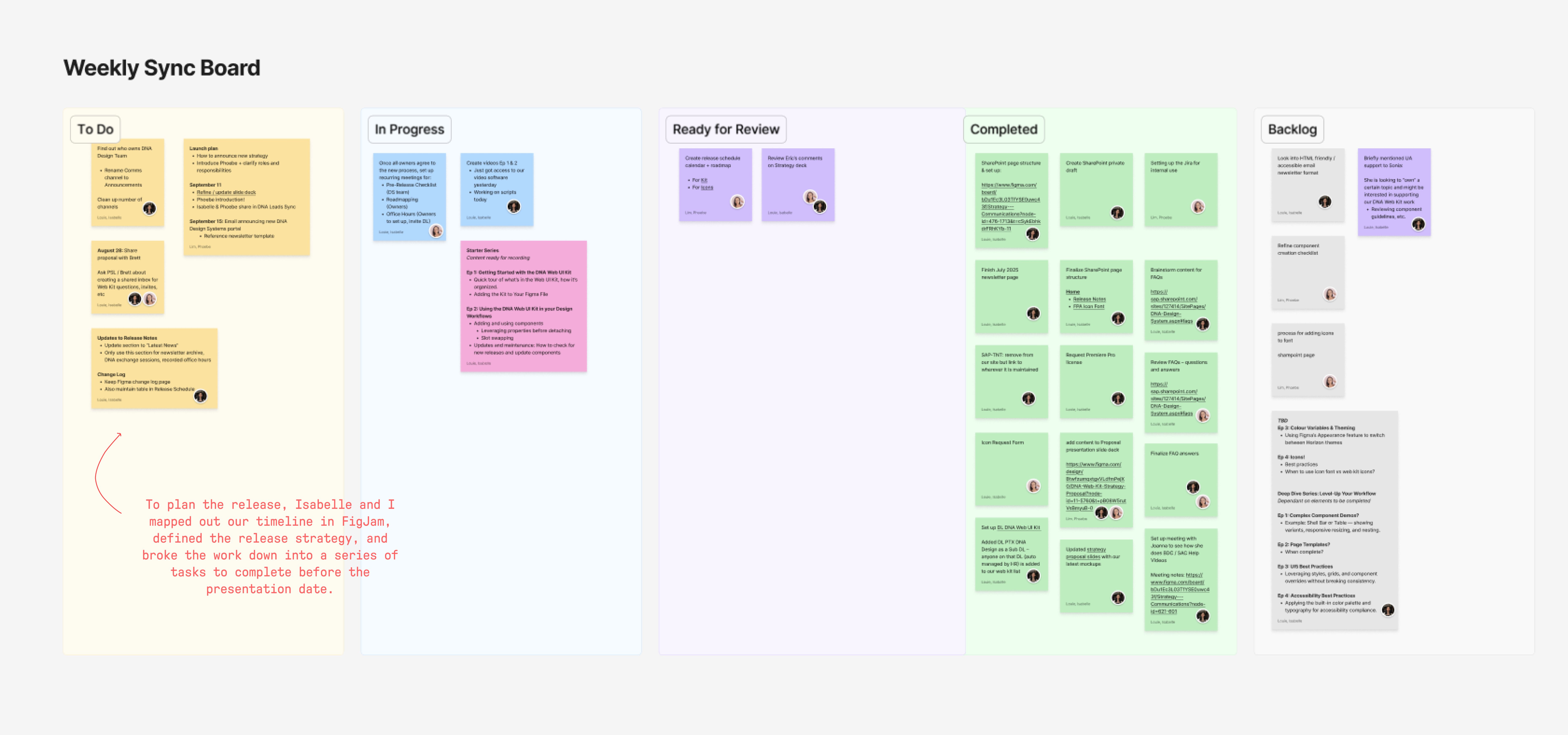
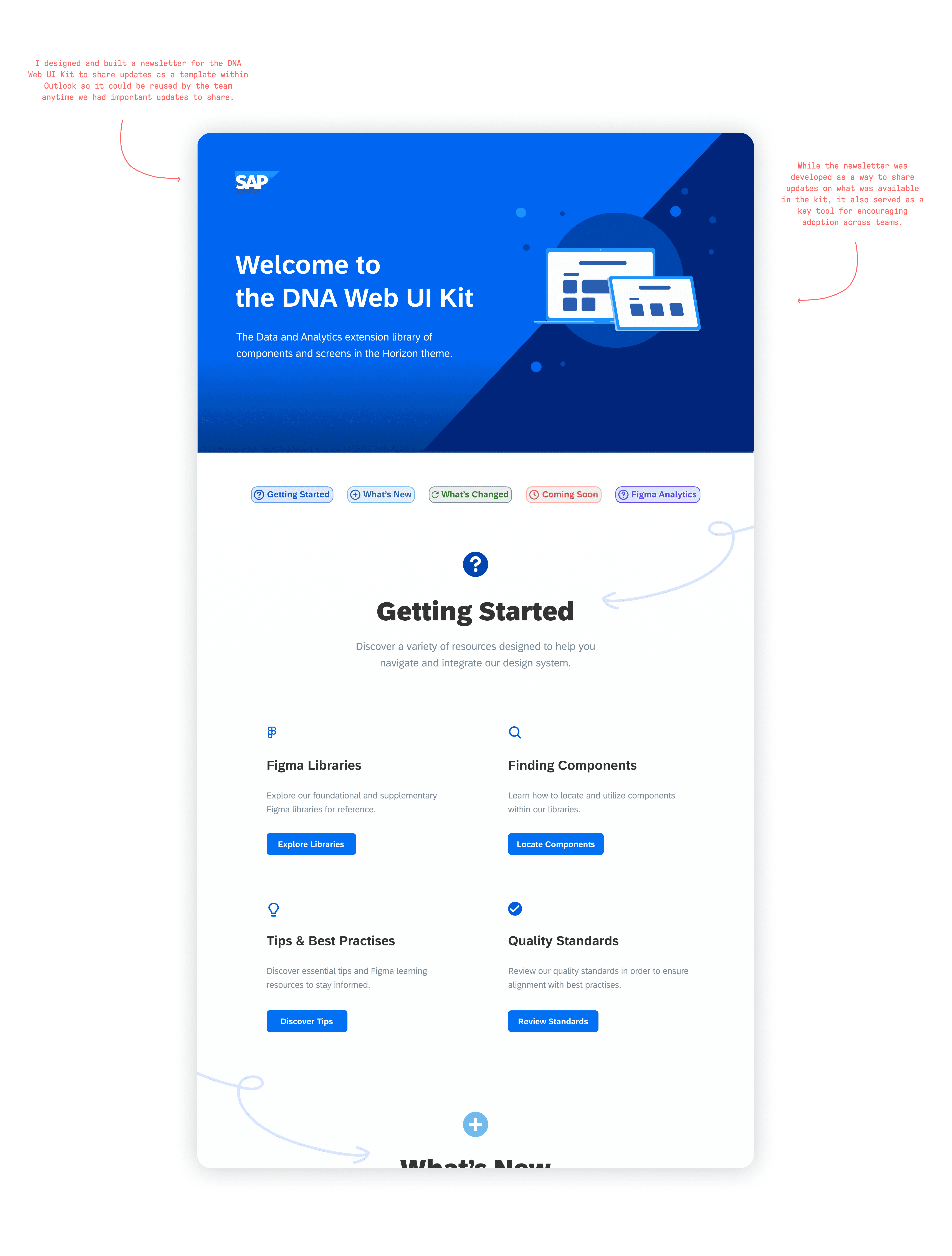
To drive adoption, I helped develop the release strategy alongside my teammate Isabelle Louie and our supervisor Priscilla Lee. This included a newsletter to communicate updates and encourage adoption across teams, a rollout presentation that walked designers through how to use the system, best practices for working with components, and guidance on how to request support and submit feedback.
To drive adoption, I helped develop the release strategy alongside my teammate Isabelle Louie and our supervisor Priscilla Lee. This included a newsletter to communicate updates and encourage adoption, rollout presentation that walked designers through how to use the system, best practices for working with components, and guidance on how to request support and submit feedback.
OUR GOAL
OUR GOAL
The goal was to make sure every designer who needed the system felt equipped to use it correctly from the moment it launched.
The goal was to make sure every designer who needed the system felt equipped to use it correctly from the moment it launched.
08 - THE RELEASE
08 - THE RELEASE
Rollout Presentation
Rollout Presentation
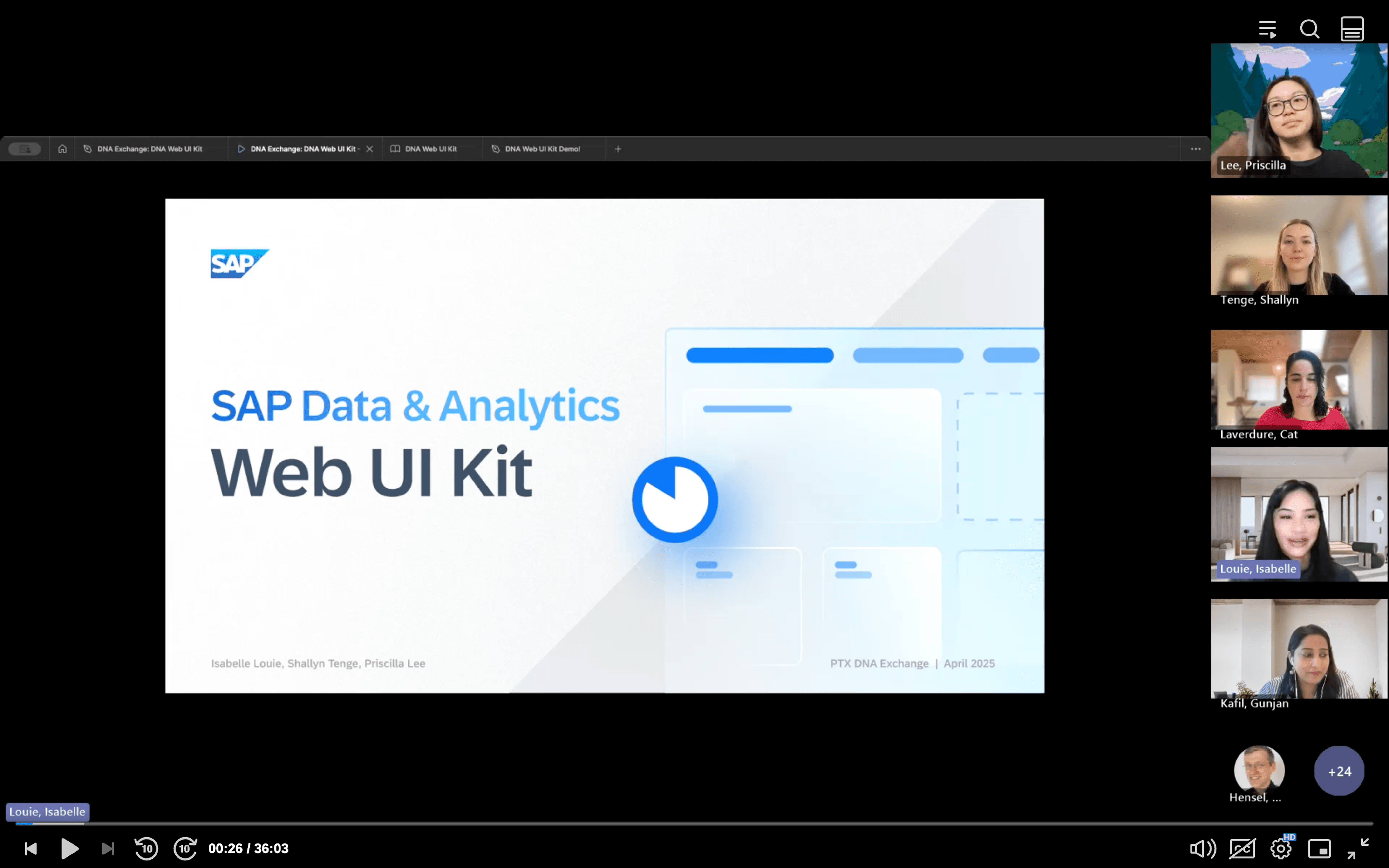
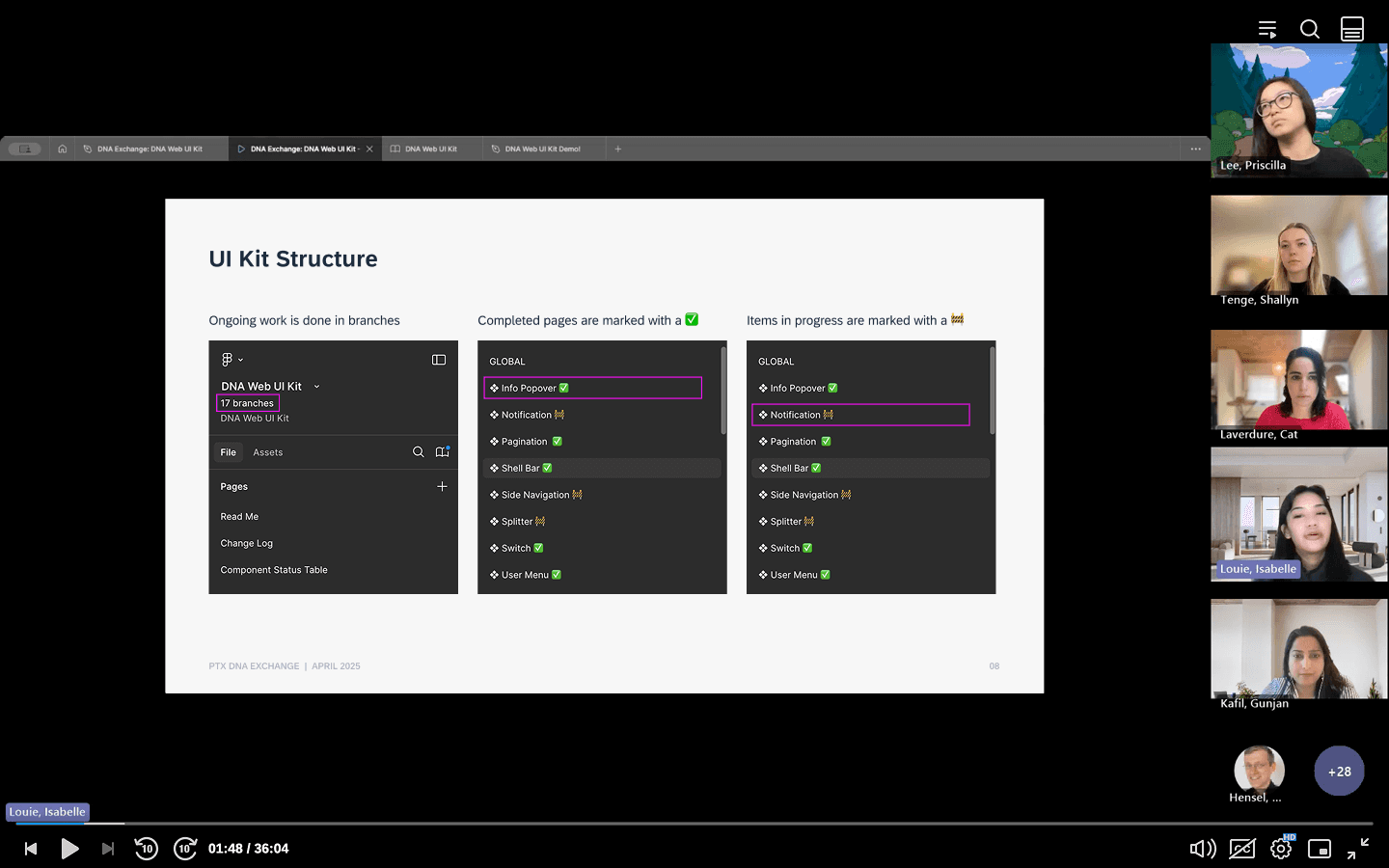
To launch the kit, Isabelle, Priscilla, and I presented and introduced the kit to the team. The presentation covered why the kit was needed, what was included, and how to use it correctly. A live demo walked designers through how to work with the components and best practices to follow, giving the team a hands on understanding of the system from day one.
To launch the kit, Isabelle, Priscilla, and I presented and introduced the kit to the team. The presentation covered why the kit was needed, what was included, and how to use it correctly. A live demo walked designers through how to work with components and best practices to follow, giving the team a hands on understanding of the system.
We also showed designers where to go to request support or submit feedback, ensuring there was a clear and direct channel for raising issues as they arose. Additionally, the newsletter was also introduced here as well, establishing it as the ongoing way for the team to stay up to date on the latest additions and changes to the kit.
We also showed designers where to go to request support or submit feedback, ensuring there was a clear and direct channel for raising issues as they arose. Additionally, the newsletter was also introduced here as well, establishing it as the ongoing way for the team to stay up to date on the latest additions and changes to the kit.
09 - CONTRIBUTIONS
09 - CONTRIBUTIONS
Tracking Adoption
Tracking Adoption
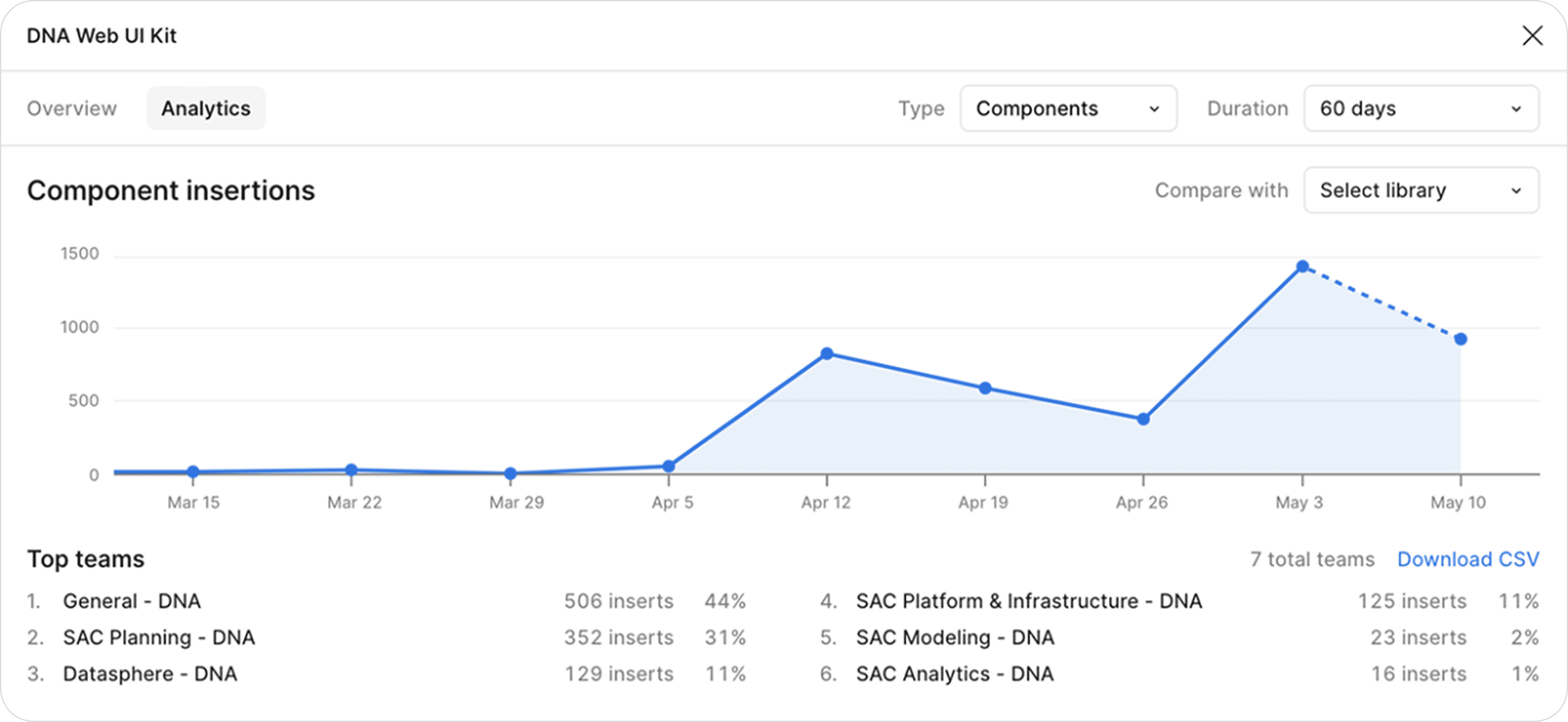
To measure the impact of the release, we tracked the number of component inserts across teams using Figma's analytics. This gave us a clear picture of how actively the kit was being used in the weeks following launch, broken down by each team. Early on data showed 1,151 total component inserts across 6 teams within the first 60 days, confirming that designers were actively working within the system rather than building independently.
To measure the impact of the release, we tracked the number of component inserts across teams using Figma's analytics. This gave us a clear picture of how actively the kit was being used in the weeks following launch, broken down by each team. Early on data showed 1,151 total component inserts across 6 teams within the first 60 days, confirming that designers were actively working within the system rather than building independently.
10 - OUTCOME
10 - OUTCOME
What It Delivered
What It Delivered
The DNA Web UI Kit gave SAP's analytics products a shared foundation for the first time, creating a single source of truth that designers could build from without recreating components, solving the same problems in isolation, or working around a system that wasn't built for their needs.
The release marked a shift, rather than building in isolation, designers now had a shared system to align to, helping to reduce future design debt, improving consistency across products, and ensuring that any future updates only needed to be made once across the entire suite.
The release marked a shift, rather than building in isolation, designers now had a shared system to align to, helping to reduce future design debt, improving consistency across products, and ensuring that any future updates only needed to be made once across the entire suite.
IMPACT
IMPACT
The new design system saw 1,151 component inserts across 6 teams within 60 days of release, demonstrating active adoption, reducing design debt, and improving consistency across the analytics suite.
The new design system saw 1,151 component inserts across 6 teams within 60 days of release, demonstrating active adoption, reducing design debt, and improving consistency across the analytics suite.
11 - REFLECTION
What I Learned
Design work doesn't start in Figma
Some of the most important work on this project happened before any designing began. Getting stakeholders aligned on a shared direction required understanding each team's needs, building a case for change, and finding a solution that worked for everyone. It's a reminder that navigating competing priorities and aligning stakeholders is just as critical as the design work itself.
A system is only as good as its adoption
Building a well structured component library is necessary but not sufficient on it's own. What made the DNA Web UI Kit effective was the investment in helping designers understand and use it correctly from the start. The release strategy, the documentation, and the support channels were not extras. They were an integral part of making the system work in practice rather than just in theory.